Agent configuration reference
The Istari Agent is configured via the file istari_digital_config.yaml. You create it while installing the agent — see the guide for Windows, Linux, or macOS. Come here for the keys you can set afterwards, and for what to do when the file is missing or the agent cannot read it.
The Agent expects the file to be located at:
%LOCALAPPDATA%\istari_digital\on Windows — that is the%LOCALAPPDATA%of the account running the agent, which is the same location for a per-user and a per-machine install, because the configuration always lives in the operating account's profile rather than in the install directory~/.config/istari_digital/on RHEL/Ubuntu~/Library/Application Support/istari_digital/on macOS
For Agents older than v8.3.0, the configuration file is named .istari_config.
It should be located at:
%LOCALAPPDATA%\istari_agent\on Windows/opt/local/istari_agent/on RHEL/Ubuntu
The files an agent uses
Besides its configuration, an agent reads a credentials file and writes a few files of its own. Knowing which is which saves time when something is missing or unreadable.
| File | What it holds | Who writes it |
|---|---|---|
istari_digital_config.yaml | The platform URL, how the agent authenticates, the path to its credentials file, and any module settings | You, during install, or the agent itself on a first start, with placeholder values it refuses to run on |
| The credentials file | The agent's Client ID, Key ID, and private key — see Which identifier is which | The web app, when Generate Key creates the agent. You copy the download onto the host and name its path in the configuration, so it can live anywhere the agent's account can read |
istari_agent_id | The Agent ID the platform gave this host. Delete it and the agent registers as a new agent on its next start, abandoning its history | The agent, the first time it registers |
istari_agent.log | Everything the agent logs, including the identifiers it starts with and the modules it loads | The agent |
istari_modules/ | One folder per installed module | You, when you unpack a module package there |
The configuration file lives in the directory at the top of this page. The runtime files — istari_agent_id, istari_agent.log, and lock files — live in a separate support directory:
%LOCALAPPDATA%\istari_agent\on Windows, or%ProgramData%\IstariDigital\istari_agent\for a per-machine install~/.local/share/istari_agent/on RHEL/Ubuntu~/Library/Application Support/istari_agent/on macOS
istari_modules/ sits beside the agent executable on Windows. For a per-user install that is the same folder as the support directory; for a per-machine install it is %ProgramFiles%\IstariDigital\istari_agent\istari_modules, separate from the ProgramData runtime files above, which is why installing or updating a module on a per-machine install needs administrator rights. On macOS it sits in the support directory. On RHEL and Ubuntu it sits in the install folder, at /opt/local/istari_agent/istari_modules.
Each of these belongs to the account that created it, so an agent started by a different account than the one that set it up may not be able to read its credentials or write its log. Which user owns the configuration covers how that goes wrong and how to line the accounts up.
Creating the File
You write this file during the install, as the account that runs the agent: the platform URL, the path to the credentials file downloaded from the web app, and the authentication mode. See step 3 of the guide for Windows, Linux, or macOS.
Agent keys covers what the values mean, rotating a key on an agent that already exists, and PAT authentication.
Automated Creation
On startup, if no previous configuration is found, the Agent will automatically generate a default istari_digital_config.yaml in the istari_digital configuration directory and then exit. The generated file contains placeholder values that must be updated before the Agent can start. At a minimum, Users must replace the placeholder values for the Required Configuration Values.
Every start after that behaves the same way for as long as the placeholders are still in place: the Agent reports that the required values must be updated, and exits. This applies whichever way the file got there — the Agent's own first start, or an installer that seeded it. A value supplied through an environment variable override counts as replaced, so the Agent starts normally and ignores the placeholder left in the file.
The runtime files the Agent writes — its log, its Agent ID, and lock files — go to the support directory instead, alongside installed modules. See The files an agent uses for both directories and what each file holds.
Which user owns the configuration
The Agent derives the configuration directory from the home directory of the account running it. When you write the file as one account and the Agent runs as another, it reads a different file from the one you edited, so it finds no credentials, writes a fresh placeholder config, and exits cleanly a few seconds after startup.
This is the usual cause on Linux hosts where the Agent runs under systemd as root while the operator set the file up under their own login. Two ways to line them up:
- Set
User=in the unit to the account whose configuration you wrote, or - Write the configuration and copy the credentials file as the account the service runs as —
sudo -u <account> …, or root's own~/.config/istari_digital/for a unit with noUser=.
A placeholder file the Agent wrote on an earlier start still sits there, so overwrite it rather than adding a second one. Check for leftovers with grep 'replace-with-' <path to istari_digital_config.yaml>: any match means the Agent will refuse to start.
Windows has the same trap in a different shape. On a per-machine install an administrator may run the installer for someone else to operate, and the installer seeds the configuration into the profile of whoever ran it, so the operating account starts an agent that finds no configuration of its own, writes a placeholder file, and exits. Have the operator write %LOCALAPPDATA%\istari_digital\istari_digital_config.yaml as themselves; If a different account will operate the agent walks through it, including the environment-variable alternative for imaged hosts.
Manual Creation
On Windows:
- Create a plain-text file
%LOCALAPPDATA%\istari_digital\istari_digital_config.yaml
On RHEL / Ubuntu:
- Create a plain-text file
~/.config/istari_digital/istari_digital_config.yaml
On macOS:
- Create a plain-text file
~/Library/Application Support/istari_digital/istari_digital_config.yaml
Editing the configuration file safely
Use this when you add module-specific keys or change auth values.
- Locate the file using the paths at the top of this page. On Windows it is in the profile of the account that runs the agent, whichever installer was used.
- Stop the agent (or plan a restart after saving). Config is read at startup.
- Open the file in a plain-text editor (VS Code, Notepad++, nano). Do not use Word or rich-text editors.
- Follow these conventions:
- Use spaces only for indentation — never tabs.
- Prefer 2 spaces per level; keep the same indent style already in the file.
- Nest new keys under the existing
agent:block. Do not add a second top-levelagent:. - Quote keys that contain
@or other special characters, for example"@istari:dassault_cameo". - Prefer double-quoted string values. On Windows paths, escape backslashes (
"C:\\Program Files\\…") or use forward slashes if the module accepts them. - Booleans are unquoted:
true/false. - Lists can be inline JSON-style arrays, for example
["27000@license.example.com"].
- Copy key names from the module’s Installation section — do not invent names.
- Validate the file if you can (YAML linter, or
python -c "import yaml; yaml.safe_load(open(r'…\istari_digital_config.yaml'))"). - Restart the agent and check the agent log for parse or configuration errors — its path is in the install guide for Windows, Linux, or macOS.
Common failures: tab indentation, wrong nesting under agent:, unquoted "@istari:…", broken Windows paths, or editing a different user’s config than the one the agent process uses.
File Contents
istari_digital_config.yaml should contain the following:
Important: Starting with the September 2025 release, the Agent configuration format and several keys changed. This page shows the new format. If you are upgrading from 2025-08-01 or earlier, review the legacy example and key mapping in the Revision History.
default: {}
agent:
  istari_digital_agent_digital_api_url: "replace-with-api-url"
  istari_digital_agent_identity_service_secret_file: "replace/with/path/to/key/file.json"
  istari_digital_agent_identity_service_enabled: true

  # If using PAT authentication, comment out the above three values and
  # uncomment and set the below two values
  # istari_digital_agent_registry_api_url: "replace-with-registry-service-url"
  # istari_digital_agent_registry_api_token: "replace-with-agent-token"
Headless Host Machines
At startup the agent builds a system tray menu — a tray icon on Windows, a Dock icon and menu bar entry on macOS. That needs a desktop session, so on a headless host the field istari_digital_agent_headless_mode: true must be added in istari_digital_config.yaml. Set it on any host where nobody signs in at the screen, on Linux hosts running the agent under systemd, and on any machine where you would rather the agent stayed out of the tray. See below.
Environment Variable Overrides
Values in the configuration file can be overriden with environment variables. To override a configuration value, create an environment variable with the same name converted to uppercase.
For example, to override the value of istari_digital_agent_registry_api_url in the configuration file, set the environment variable ISTARI_DIGITAL_AGENT_REGISTRY_API_URL.
Proxy settings are not keys in this file. If the host routes outbound HTTP through a forward proxy, see Proxy configuration.
Required Configuration Values
Certain values must be set to configure how the agent authenticates to the Istari Digital Platform. All other values are optional, as the agent will fall back to reasonable defaults if they are not set.
Identity Service secrets should only be used when the Identity Service is enabled.
istari_digital_agent_digital_api_url
This value is the Istari Digital Platform URL that the Istari Agent will connect to. The URL can be found in Developer Settings, under Endpoints, as the API URL.
Copy the entire API URL address from Developer Settings and replace the value between double quotes.
istari_digital_agent_identity_service_secret_file
This value is the path to the key the Istari Agent uses to authenticate itself to the Istari Platform. The key will have to be generated by an Istari administrator. Replace the path value between double quotes.
On installations with more than one tenant, the agent joins the tenant the administrator was signed in to when they generated this key. See Agent Multi-Tenancy.
Creating a key
There are two ways to create an Agent key:
- In the web app — see the Admin Guide. Generate the key, download the credentials file, and copy it onto the Agent host.
- On the Agent host, with the CLI — see Creating a New Agent with a Key. This generates the keypair on the host, creates the Agent, and sets the values on this page for you, so the private key never leaves the machine.
Either way, the Agent's key must be created by an administrator, and the Agent is created in that administrator's tenant.
stari agent init writes PAT credentials only. For a key-based Agent, use stari key create-agent --configure (or stari key exchange --agent when migrating an Agent that already has a PAT) to write the configuration, or set the values below by hand.
istari_digital_agent_identity_service_enabled
This value controls whether or not the Istari Agent uses key-based authentication to authenticate itself to the Istari Platform. This value must be set to true to use key-based authentication.
PATs are deprecated as of the July 2026 release and have been superseded by Keys. Support for PATs will be removed from the platform in a future release.
See the PAT → Key Exchange guide to migrate to keys.
The istari_digital_agent_registry_api_url and istari_digital_agent_registry_api_token values MUST be set to use PAT authentication. istari_digital_agent_identity_service_enabled must be unset or set to false to use PAT authentication.
istari_digital_agent_registry_api_url
This value is the Istari registry service URL that the Istari Agent will connect to. The URL can be found in Developer Settings, under Endpoints, as the .
Copy the entire Registry URL address from Developer Settings and replace the value between double quotes.
istari_digital_agent_registry_api_token
This value is the token the Istari Agent uses to authenticate itself to the Istari Platform. The token will have to be generated by an Istari administrator. Replace the token value between double quotes.
On installations with more than one tenant, the agent joins the tenant the administrator was signed in to when they generated this token. See Agent Multi-Tenancy.
Creating a token
See the Admin Guide for instructions on creating an Istari Agent API token.
Optional Configuration Values
These values are optional, as the agent will fall back to reasonable defaults if they are not set.
In most circumstances these values do not need to be adjusted.
These values can be set by adding them to the YAML blob in the istari_digital_config.yaml file.
For example, to set the istari_digital_agent_poll_interval to 60 seconds, the file contents from above could be modified as follows:
default: {}
agent:
  istari_digital_agent_registry_api_url: "https://registry.istari.com"
  istari_digital_agent_registry_api_token: "agent-token-string"
  istari_digital_agent_poll_interval: 60
Agent Metadata
istari_digital_agent_display_name
(Optional) The name shown for this agent under All Agents in the web app. Configuration is read at startup, so set it before the first start or restart the agent after you add it.
The default is a random name assigned by the registry (for example iconic-morgoth-9091). That name is also written to the agent log as Got display name '…' from server.
Auth Management
istari_digital_agent_identity_service_auto_migrate
(Optional) This value governs whether or not the agent will attempt to automatically migrate itself from using a PAT to authenticate to using a key to authenticate. If set to true, the agent will detect if it is using a PAT to authenticate against an Istari Digital Platform instance with the Identity Service enabled, exchange its PAT for a key, and reconfigure itself to use the new key instead of its PAT. The agent will rewrite its istari_digital_config.yaml file to persist the new key and authentication settings. The exchange will only be performed when the agent is idle and not working on any jobs.
This value has no effect if istari_digital_agent_identity_service_enabled is already true or the agent is authenticating against an Istari Digital Platform instance that does not have the Identity Service enabled.
The default value is false.
Agent Behavior
istari_digital_agent_log_level
(Optional) This value governs the verbosity of the logs output by the agent. The values are, from most to least verbose, "debug", "info", "warning", "error", "critical".
The default value is "info".
istari_digital_agent_module_configurations
You can define module-specific configuration under the istari_digital_agent_module_configurations collection. Each module is keyed by its full name (e.g., @istari:matlab). You may also specify configuration for specific versions if it is supported by the Module.
Starting with istari-agent 9.8.0 and newer module versions (cameo-module 3.0.0, creo-module 3.0.0, catia-module 2.4.0, 3dexperience-module 1.3.0), configuration variables have been standardized. While old configuration variables remain supported for backward compatibility, we strongly encourage using the new standardized variable names shown in the example below.
Please refer to each Module's documentation to confirm compatibility.
- Entries in the
istari_digital_agent_module_configurationscollection should be enclosed in double quotes""- This helps to reduce errors translating YAML to JSON
Example:
default: {}
agent:
  istari_digital_agent_registry_api_url: "https://registry.istari.com"
  istari_digital_agent_registry_api_token: "agent-token-string"
  istari_digital_agent_module_configurations:
    "@istari:dassault_cameo":
      "2021x-refresh2":
        "dassault_cameo_install_dir": "/path/to/cameo/2021x/installation/dir/"
        "dassault_cameo_license_server_hosts": ["27000@localhost"]
        "dassault_cameo_license_name": "CameoEnterpriseArchitectureEnt"
      "2022x-refresh2":
        "dassault_cameo_install_dir": "/path/to/cameo/2022x/installation/dir/"
        "dassault_cameo_license_server_hosts": ["27000@localhost"]
        "dassault_cameo_license_name": "CameoEnterpriseArchitectureEnt"
      "2024x-refresh2":
        "dassault_cameo_install_dir": "/path/to/cameo/2024x/installation/dir/"
        "dassault_cameo_license_server_hosts": ["27000@localhost"]
        "dassault_cameo_license_name": "CameoEnterpriseArchitectureEnt"
    "@istari:ptc_creo_parametric":
      "ptc_creo_parametric_executable_path": "/path/to/creo/parametric.exe"
      "ptc_creo_parametric_renderer_executable_path": "/path/to/render/tool"
      "ptc_creo_parametric_converter_executable_path": "/path/to/convert/tool"
    "@istari:dassault_catia_v5":
      "dassault_catia_v5_renderer_executable_path": "/path/to/render/tool"
      "dassault_catia_v5_converter_executable_path": "/path/to/convert/tool"
    "@istari:dassault_3dexperience_catia":
      "dassault_3dexperience_install_dir": "/path/to/3dexperience/installation"
      "dassault_3dexperience_product_attr_name": "PLM_ExternalID"
istari_digital_agent_process_timeout
(Optional) This value, in seconds, determines how long the Agent should wait for a module to finish executing a function.
The default value is 600.
istari_digital_agent_poll_interval
(Optional) This value governs how often, in seconds, the agent queries the Istari platform for jobs.
The default value is 15.
istari_digital_agent_archive_poll_interval
(Optional) This value governs how often, in seconds, an archived agent queries the Istari platform to determine if it is still archived.
The default value is 300.
istari_digital_agent_output_path
(Optional) This value governs where the agent writes job output data. This value must be an absolute path. The agent must have permission to write to this folder. The folder must have sufficient storage space for the Istari Agent to write job outputs.
The default value is C:\temp\output\ on Windows and /tmp/output/ on RHEL, Ubuntu, and macOS.
istari_digital_agent_headless_mode
(Optional) This value governs whether the agent attempts to create GUI elements. This value must be set to true if the agent is running on a 'headless' host machine.
The default value is false.
istari_digital_agent_status_update_retry_limit
(Optional) This value governs how many attempts the agent makes to update a job's status before marking the job as failed.
The default value is 5.
istari_digital_agent_download_retry_limit
(Optional) This value governs how many attempts the agent makes to download a job input before marking the job as failed.
The default value is 5.
istari_digital_agent_upload_retry_limit
(Optional) This value governs how many attempts the agent makes to upload a job output before marking the job as failed.
The default value is 5.
istari_digital_agent_upload_pool_size
(Optional) How many threads to use to simultaneously upload job outputs. This must be a number between 1 and 15.
The default value is 4.
Auth Integrations
istari_digital_agent_private_key_path
(Optional) Path to the private key file the agent uses to decrypt credentials delivered for authenticated jobs. You normally do not need to set this: when auth support is enabled (the default), the agent generates a key at the default path on first start and registers the matching public key automatically. Set this only to point the agent at a specific existing key file.
The default value is the path to a file private_key.pem in the same folder as istari_digital_config.yaml.
Over-the-Air (OTA) Updates for Modules
The Agent uses the following values to handle over-the-air updates of modules.
It reaches out to a specific repository (istari_digital_agent_module_registry_repo) located at a registry (istari_digital_agent_module_registry_url) using a token (istari_digital_agent_module_registry_auth_token) to look for updates to specific modules (istari_digital_agent_module_registry_modules_to_update).
Notes:
- All four values must be set to use this feature
- Module releases must include
linuxorwindowsin the name of the file
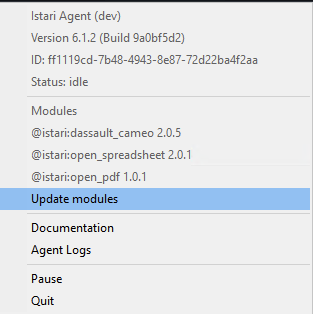
Module updates can only be triggered via the System Tray on Windows machines.
istari_digital_agent_module_registry_url
(Optional) API URL for the module releases registry (JFrog Artifactory–compatible API at istaridigital.jfrog.io).
The default is None.
istari_digital_agent_module_registry_auth_token
(Optional) Personal access token or other auth token for that registry. Generate a token from the Istari Customer Portal for your organization’s JFrog service account when required.
The default is None.
istari_digital_agent_module_registry_repo
(Optional) Name of the repository hosting module releases in the registry.
The default is None.
istari_digital_agent_module_registry_modules_to_update
(Optional) List of modules (full qualified module name, i.e. ["@my_org:my_module"]) to check and update.
The default is None.
Sentry Logging
The follow configuration values are used to capture and log to Sentry.
Note: All three values must be set to use the feature.
istari_digital_agent_sentry_enabled
(Optional) Flag to enable and disable sentry integration.
The default is false.
istari_digital_agent_sentry_dsn
(Optional) DSN for sentry integration.
The default is None.
istari_digital_agent_sentry_environment
(Optional) The running environment (production).
The default is local.
OpenTelemetry Reporting
The following configuration values are used to report traces and log data to an OpenTelemetry backend.
istari_digital_agent_otel_enabled
(Optional) Flag to enable and disable OpenTelemetry integration.
The default is false.
istari_digital_agent_otel_service_name
(Optional) The service name to report to OpenTelemetry.
The default is istari-digital-agent.
istari_digital_agent_otel_exporter_otlp_endpoint
(Optional) The OpenTelemetry endpoint to report to.
The default is http://localhost:4318.
istari_digital_agent_otel_exporter_otlp_protocol
(Optional) The OpenTelemetry protocol to use.
The default is http/protobuf.
Configuration History
-
2026-07 (July release)
- Added support for Identity Service key-based authentication.
- Added fields
istari_digital_agent_digital_api_url,istari_digital_agent_identity_service_secret_file,istari_digital_agent_identity_service_enabled, andistari_digital_agent_identity_service_auto_migrate
-
2025-09 (September release)
- Format: moved from single
default:block to two sections:default:(platform URL) andagent:(token and agent options). - Key renames (2025-08-01 legacy → September 2025 format):
- Core:
istari_api_url→istari_digital_agent_registry_api_url;istari_agent_api_token→istari_digital_agent_registry_api_token. - Agent options:
istari_agent_display_name→istari_digital_agent_display_name;istari_agent_log_level→istari_digital_agent_log_level;istari_agent_output_path→istari_digital_agent_output_path;istari_agent_pull_interval→istari_digital_agent_poll_interval;istari_agent_process_timeout→istari_digital_agent_process_timeout;istari_agent_status_update_retry_limit→istari_digital_agent_status_update_retry_limit;istari_agent_download_retry_limit→istari_digital_agent_download_retry_limit;istari_agent_upload_retry_limit→istari_digital_agent_upload_retry_limit;istari_agent_upload_pool_size→istari_digital_agent_upload_pool_size;istari_agent_headless_mode→istari_digital_agent_headless_mode. - Module configuration:
module_configurations→istari_digital_agent_module_configurations. - OTA updates:
registry_url→istari_digital_agent_module_registry_url;registry_auth_token→istari_digital_agent_module_registry_auth_token;registry_modules_repo→istari_digital_agent_module_registry_repo;registry_modules_to_update→istari_digital_agent_module_registry_modules_to_update. - Sentry:
istari_agent_sentry_dsn→istari_digital_agent_sentry_dsn;istari_agent_sentry_enabled→istari_digital_agent_sentry_enabled;istari_agent_sentry_environment→istari_digital_agent_sentry_environment.
- Core:
- Token creation guidance: see Agent Token Configuration.
Legacy (2025-08-01) format example:
default:istari_api_url: <API_URL>istari_agent_api_token: <AGENT_PAT># Optional# istari_agent_display_name: <AGENT_DISPLAY_NAME># istari_agent_log_level: "info"# istari_agent_output_path: "/tmp/output/"# istari_agent_pull_interval: 5# istari_agent_process_timeout: 600# istari_agent_status_update_retry_limit: 5# istari_agent_download_retry_limit: 5# istari_agent_upload_retry_limit: 5# istari_agent_upload_pool_size: 4# istari_agent_headless_mode: false# Auth integrations# istari_agent_private_key_path: "/path/to/private_key.pem"# Over-the-Air (OTA) updates (beta)# registry_url: <REGISTRY_URL># registry_auth_token: <REGISTRY_AUTH_TOKEN># registry_modules_repo: "some-istari-module-directory"# registry_modules_to_update: ["@my_org:my_module"]# Sentry logging# istari_agent_sentry_dsn: "<sentry-dsn>"# istari_agent_sentry_enabled: false# istari_agent_sentry_environment: "local"# Module configuration# module_configurations:# "@istari:matlab":# "matlab_home": "/path/to/matlab"Key rename mapping (2025-08-01 → September 2025):
Legacy key New key istari_api_urlistari_digital_agent_registry_api_urlistari_agent_api_tokenistari_digital_agent_registry_api_tokenistari_agent_display_nameistari_digital_agent_display_nameistari_agent_log_levelistari_digital_agent_log_levelistari_agent_output_pathistari_digital_agent_output_pathistari_agent_pull_intervalistari_digital_agent_poll_intervalistari_agent_process_timeoutistari_digital_agent_process_timeoutistari_agent_status_update_retry_limitistari_digital_agent_status_update_retry_limitistari_agent_download_retry_limitistari_digital_agent_download_retry_limitistari_agent_upload_retry_limitistari_digital_agent_upload_retry_limitistari_agent_upload_pool_sizeistari_digital_agent_upload_pool_sizeistari_agent_headless_modeistari_digital_agent_headless_modeistari_agent_private_key_pathistari_digital_agent_private_key_pathmodule_configurationsistari_digital_agent_module_configurationsregistry_urlistari_digital_agent_module_registry_urlregistry_auth_tokenistari_digital_agent_module_registry_auth_tokenregistry_modules_repoistari_digital_agent_module_registry_reporegistry_modules_to_updateistari_digital_agent_module_registry_modules_to_updateistari_agent_sentry_dsnistari_digital_agent_sentry_dsnistari_agent_sentry_enabledistari_digital_agent_sentry_enabledistari_agent_sentry_environmentistari_digital_agent_sentry_environment - Format: moved from single